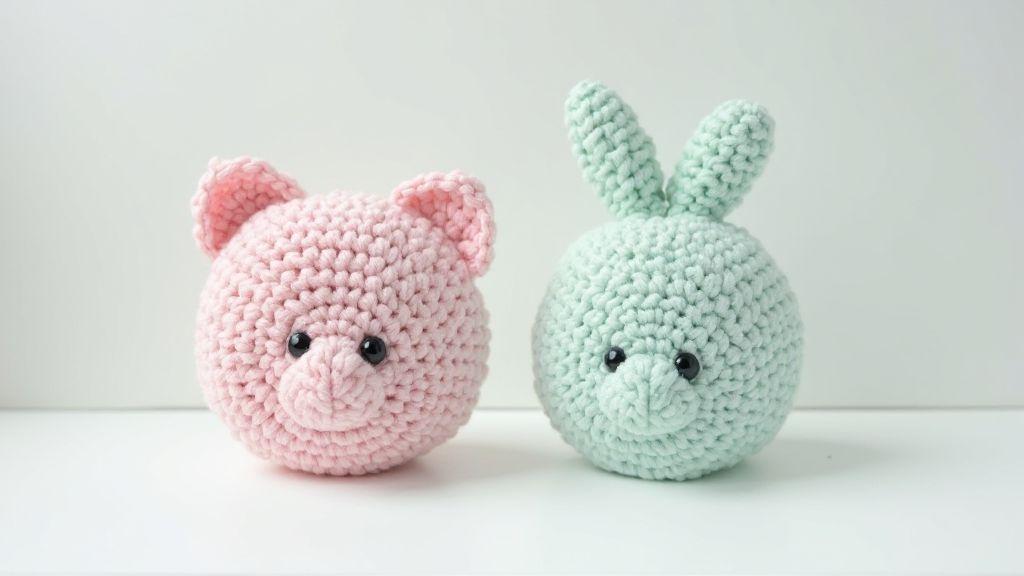
How to Design Flat Amigurumi vs 3D Amigurumi
Proportions for flat vs 3D amigurumi
You’ll feel the difference when sizing your projects. Flat amigurumi sit close to the page, so their dimensions are wider and edges lie flat. 3D amigurumi push out into space, so you need more depth and roundness to avoid looking flat. Plan in layers: head, body, and limbs as separate blocks you’ll connect. Use proportion clues from real objects—think of a small teddy or plush toy—and translate them into crochet stitches. Your goal is a balanced silhouette where neither head nor limbs overwhelm the piece.
If you’re new, start simple with a flat face first. Proportions stay more proportional when you lay out stitches in a single plane. For 3D pieces, add volume gradually with increases that hug curves to keep the head sitting on the neck and the body sturdy rather than wobbly. Keeping a consistent scale as you switch between flat and 3D trains your eye to spot when a limb needs an extra row or when the head should be slightly smaller to fit the body.
Even tiny changes shift the overall look. A half-row here or an extra stitch there can tilt the balance between cute and creepy. Map out proportions first, then crochet with confidence. If a test piece looks off, tweak the head-to-body ratio before finalizing.
How to Design Flat Amigurumi vs 3D Amigurumi: quick starter tips
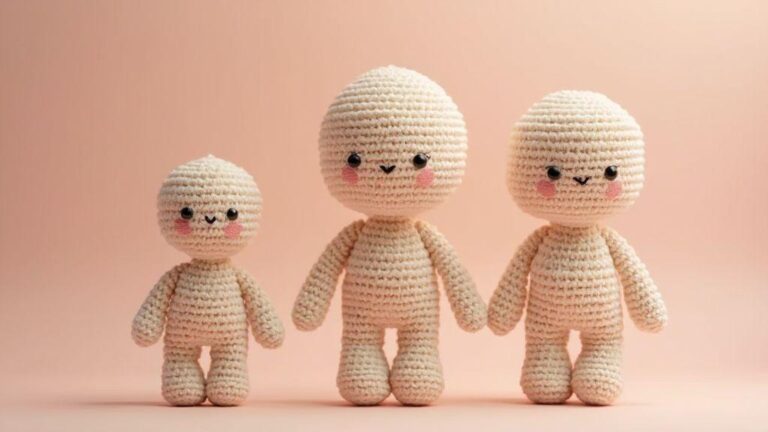
For quick orientation, visualize the different readouts of flat versus 3D forms. In flat pieces, keep the head slightly larger in proportion to the body to read clearly from the front. In 3D pieces, balance the head with a thicker neck and broader shoulders to avoid a top-heavy look. Place the head on a neck tall enough to support it, then shape the body so it sits evenly on that neck with comfortably extending limbs.
Sketch first to map widest points along a vertical axis. For flat designs, align eyes on a straight line and keep the mouth centered. For 3D, account for depth by placing features slightly forward to read from multiple angles. If a 3D figure tilts, adjust neck length or shoulder width until it sits upright. Practice with quick prototypes to learn where balance breaks and how to fix it.
These tips aren’t rules—adapt them to your style and materials. The core idea is a well-balanced design that stays recognizable, comfortable to hold, and pleasing from all angles.
Check stitch counts for amigurumi to set your size
Decide your target size first, then count stitches to reach it. For a small 4-inch figure, keep stitches tight and compact. For larger pieces, add rounds thoughtfully: know roughly how many stitches across the widest part will fit your planned size. Verify with comparison pieces or a ruler. Tension matters: a single loose stitch can alter final dimensions.
Keep a simple log of stitch counts per round for each section and compare with your model or template. If the head needs to be 2 rounds wider, adjust early rounds. When moving from flat to 3D, you’ll often add rows to the sides to build volume, then taper to shape. Test with a mini assembly before finishing.
If scaling up, multiply stitch counts carefully. Don’t scale evenly; curves and corners need extra attention so the final form remains smooth. Your notes become a cheat sheet for future projects, helping you hit the right size without guessing.
How to Design Flat Amigurumi vs 3D Amigurumi tips to balance head and body
To balance the head and body, use distinct silhouette cues for flat versus 3D forms. In flat pieces, keep the head slightly larger to read clearly from the front. In 3D pieces, widen the neck and shoulders to avoid a top-heavy look. Start with a neck tall enough to support the head, then shape the body so it sits evenly, with limbs that extend comfortably. Sketch the widest points and align features along a vertical axis. For flat designs, line eyes along a straight line and center the mouth. For 3D, consider depth so features read from different angles. If the figure tilts, adjust neck length or shoulder width until upright. Practice with quick prototypes to learn where balance breaks.
Measure and mark placement on your pieces
Mark eyes, nose, and mouth precisely on flat faces, then translate marks to the 3D form. Use a soft pencil or removable stitch marker to keep spots exact as you sew on features. Measure from the center line to ensure symmetry, especially when weaving multiple colors. A tiny misplacement can throw off the look, so take your time.
Note where the neck connects to the head and where the torso begins. Place limbs with even spacing, adjusting for crowding or gaps from different angles. Consistency across similar pieces saves future confusion. Always verify balance before final assembly to ensure the amigurumi is sturdy and expressive.
Amigurumi pattern drafting differences
Two big worlds in pattern drafting: flat panels and 3D rounds. Flat amigurumi design uses large panels sewn together later, making shape planning easier and enabling you to map parts on a grid. Think puzzle pieces laid out on a table before assembly. Track rows and columns, label panels, and keep proportions consistent so the toy reads well from every angle.
3D amigurumi design uses rounds to build depth directly. Plan from the center out, focusing on circumference as well as height and width. Gauge swatches help catch asymmetry early, keeping the final piece cute and proportional. Sketch both styles side by side to see how flat panels translate to rounds, and keep a tidy note system to translate counts between panels and rounds smoothly.
Draft flat panels with row and column counts for flat amigurumi design
Begin with a clean grid for each panel, noting rows and stitches across each row. Ensure widths and heights align when sewn together. Label edges that meet other panels to avoid mix-ups. Draft head, body, arms, and legs as separate panels and compare proportions to prevent a lopsided toy.
Plan with average shape math: longer rows near the middle for a rounded belly, even increments for symmetry. Mark increases and decreases and note stitches per row. Test counts on cheap yarn by crocheting quick mini versions of panels to confirm proportions before committing to the full piece. If a panel is too wide, adjust row counts and recheck alignment with other panels.
Translate panels into rounds for 3D amigurumi design using amigurumi pattern drafting
Convert flat panel counts into round counts. Start with a central area (neck or head) and plan increases so the circumference matches the drafted panel width. Keep a round-by-round map to maintain steady shape as you add rounds around the center. Remember proportion: a longer torso means more rounds in that area, not just more stitches per round.
Think about transitions: join lines between panels should align with round edges. Use consistent stitch counts and check symmetry on both sides. A quick mock-up with simple props can help you feel where curves need softening or sharpening. Test the entire flow with a simple template to verify the shape before committing to the full pattern. If something looks off, adjust increases, decreases, or the number of rounds in critical areas for a natural, friendly silhouette.
Test simple templates before final pattern
Crochet a small version (head or limb) using planned round counts to catch scale issues and edge smoothness. Compare this mini template to your flat panel draft; they should align in size and curve. If they don’t, revise stitch counts or shaping points. Document what worked for future patterns and try a slightly different approach if needed. A successful test saves time and keeps future projects consistent.
Crochet shaping techniques for 2D and 3D
Shaping involves changing the fabric with every stitch. In 3D amigurumi, you grow and reduce to form curves and hollow areas. In 2D pieces, aim for smooth surfaces and precise edges for appliqués or facial features. The goal is controlled tension and stitch counts to maintain form.
- 3D shaping uses increases and decreases to sculpt volume and contour. Place decreases where you want fabric to pull in, not where you want it to stay flat. Mirror shaping to avoid lumps and test frequently with mock-ups.
- 2D shaping still uses increases and decreases, but focus is on edge control and surface contours. Surface crochet and slip stitch shaping help add details without bulk.
Use increases and decreases for 3D amigurumi design and sculpting
Start with a basic round and add increases to widen where you want volume. Count stitches carefully to keep shapes even. Decrease to create natural curves—think tapering from cheeks to jaw, or at an elbow. Place decreases where you want fabric to pull in for smooth contours. Mirror shaping and testing helps avoid dimples or bumps. Minor adjustments, like a pinch or a tiny snag of yarn, can smooth contours and improve symmetry.
Use surface crochet and slip stitch shaping for flat amigurumi design
Surface crochet adds tiny details on top of a flat panel for eyes, mouths, or brows without thickening the piece. It keeps the base fabric flat and clean. Slip stitch shaping nudges edges inward or outward along a panel, creating defined boundaries between colors or sections. This quiet technique yields crisp silhouettes without bulky seams.
Practice shaping with small swatches
Create tiny swatches (4×4 or 6×6) to test increases, decreases, and surface details. Compare swatches to your flat panel drafts to ensure alignment. Keep notes on how changes affect the final look, and repeat until satisfied. These tests become your reference for bigger designs.
Surface crochet and facial details
Surface crochet adds flat features to keep the amigurumi face expressive. Plan shapes before attaching and use small stitches for eyes or freckles. Embroidery can supplement with fine lines like eyelids or lip contours. Combine surface crochet with embroidery for hybrid faces, balancing bold features with subtle lines to maintain readability from distance.
Plan eye and nose placement before sewing
Determine eye and nose positions before attaching features to avoid a lopsided face. Lightly mark locations, consider overall head size, and test with light stitching before final sewing. If adjustments are needed, reposition before final attachment. An organized approach reduces rework and keeps the face balanced.
Assembly, stuffing and structural support
Plan how pieces meet and stay together as you sew and glue. Treat each seam as a bridge between parts. For 2D amigurumi, attach flat pieces to a backing so the figure holds shape and lies flat when desired. For 3D amigurumi, build an internal skeleton first, then add stuffing to push out the curves. Balance is key: too much stuffing creates lumps; too little yields saggy edges. Aim for firm but gentle support that allows a bit of poseability.
Sew flat pieces to a backing for 2D amigurumi tutorial styles
Sew flat pieces to a backing to create a sturdy two-dimensional base. Align pieces, pin, and whip stitch around edges, leaving a small opening to turn and lightly stuff if needed. After finishing edges, press the backing to reduce puckering and reinforce corners for durability. This method yields clean silhouettes ideal for displays or scenes.
Add stuffing and internal support for stable 3D amigurumi design
Start with a light internal core, then add stuffing gradually using a blunt tool to shape tight curves. Include an internal support (wire, pipe cleaners, or a lattice) to prevent shifting and allow posing. Avoid overstuffing; aim for smooth surfaces with defined areas like brows or cheeks. Test balance by placing head, torso, and limbs in their intended positions during assembly.
Choose the right fill and support materials
For 2D flat pieces, light batting or low-loft stuffing keeps shape while remaining pliable for backing. For 3D pieces, firmer stuffing plus a light internal skeleton prevents sagging. If you need flexibility, combine stuffing with slim wire or pipe cleaners for poseability. Test a small sample first to see how materials behave with your stitch pattern and backing.
Test, convert and fine tune your patterns
Start with a small pattern test to feel proportions and catch issues. Use the same yarn weight, hook size, and tension planned for the final project. If the gauge runs tight, shapes will be compressed; if loose, they’ll flop. Treat the swatch as a dress rehearsal and document what works. If you notice drift (e.g., head too tall or arms too short), plan quick adjustments before continuing.
Test the full sequence of the pattern with a couple of limbs and the core body to see how they balance with the head. If a test piece looks off, adjust stitch counts or shaping before proceeding. Schedule a final test with eyes, stuffing, and embroidery, as these details can shift the silhouette more than expected. If everything looks right, finalize your instructions for production-ready notes.
Check gauge and adjust stitch counts for amigurumi before you start
Lock in your gauge first. Gauge links pattern to final size: if your gauge is 5 stitches per inch but you need a 4-inch circumference, you’ll aim for about 20 stitches around. Crochet looser or tighter to match target size, and keep a running note of these figures. Recalculate if measurements drift, and apply adjustments in the pattern’s shaping points rather than across entire sections. Clear notes help you reproduce the look and simplify troubleshooting for future makers.
Convert flat vs 3D amigurumi patterns with simple scaling rules and amigurumi dimensionality tips
Flat patterns resemble drawing on a balloon—cute but two-dimensional. To achieve dimensionality, add rounds that push sides outward while preserving the core shape. Apply proportional increases or decreases around major sections. When converting a flat pattern to 3D, add depth by increasing stitches around the middle and tapering toward ends. Treat the body as a central axis to maintain symmetry and a natural, rounded look. Use round shaping where you need volume and short rows where you need flat surfaces. Compare the silhouette with target dimensions from the same viewing angle and keep proportional notes to speed future conversions.
Keep notes on changes and retest prototypes
Notes are the map of your amigurumi journey. Record changes: stitch counts, where you added or removed rounds, yarn type, hook size, and tension. Note what worked and what didn’t, including how stuffing or embroidery affected scale. When you prototype, match the gauge with the final materials. If adjustments are needed, crochet a quick mini version of the affected area and reassemble to confirm the silhouette. A tidy set of notes makes patterns reproducible and troubleshooting faster, especially when sharing or publishing.
If you’re adjusting after a prototype, retest with the exact finishing touches to ensure the changes behave well in 3D space. Small retests often reveal big fixes. When you’re satisfied, you’ll have a clean, repeatable blueprint for production-ready notes.
Clara Fern — Crochet Artist & Amigurumi Designer
Clara Fern is a crochet artist and amigurumi designer based in Austin, Texas. With 9 years of experience working with yarn and hook, she transformed a lifelong passion for handcraft into a creative mission: making amigurumi accessible, fun, and deeply rewarding for crafters of all levels.
Clara discovered amigurumi during a trip to Japan in 2017, where she fell in love with the art of bringing tiny characters to life through crochet. Back home in Texas, she spent years studying color theory, design principles, and advanced crochet techniques — developing her own signature style that blends kawaii aesthetics with original character design.
Through maclafersa.com, Clara shares everything she has learned — from choosing the right yarn and reading your first pattern, to designing fully original amigurumi characters from scratch. Her writing is known for being clear, detailed, and genuinely helpful, with no steps skipped and no secrets kept.
When she’s not crocheting, Clara enjoys watercolor painting, visiting local yarn shops, and drinking way too much coffee while sketching new character ideas.